RPACT Cloud
RPACT Cloud: Interactive Trial Design Without Writing R Code
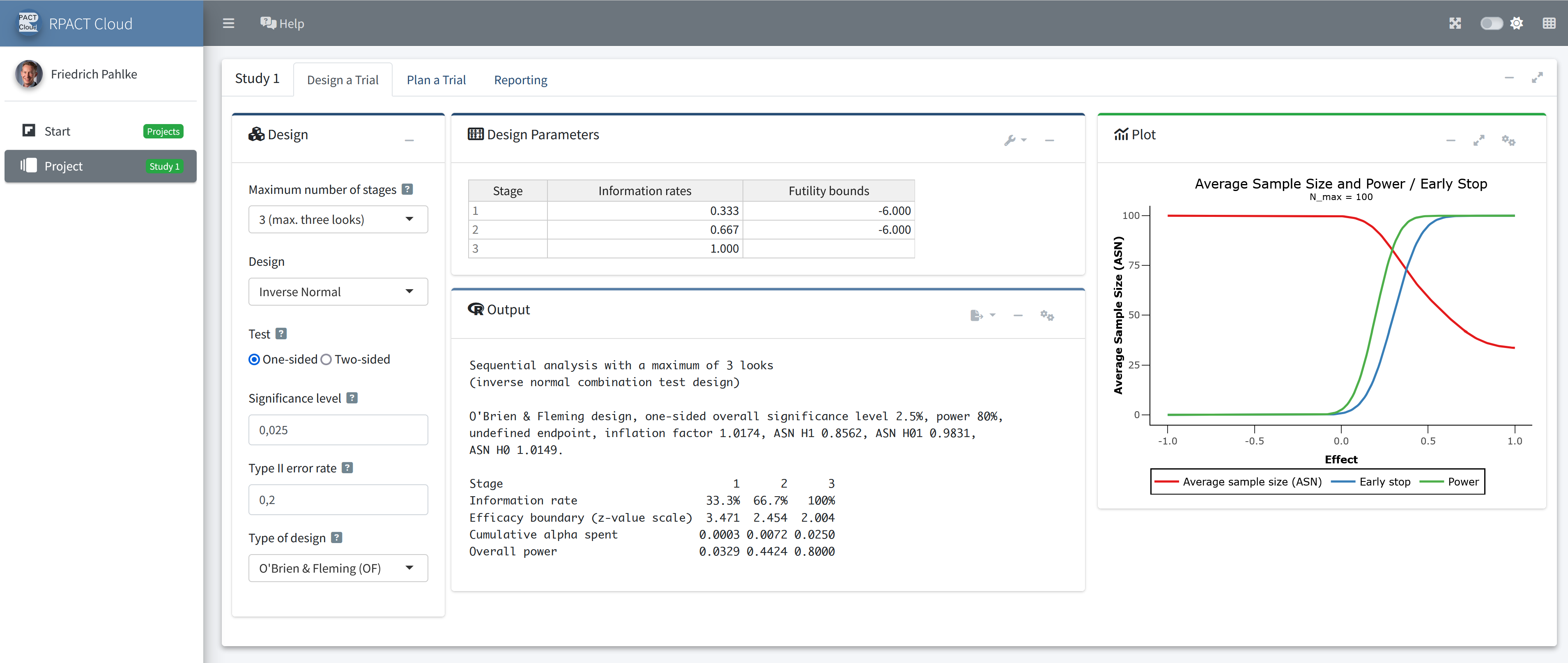
RPACT Cloud is the web-based graphical user interface for the validated R package rpact. It brings the power of rpact to statisticians, clinical trial teams, and decision makers who want to design, compare, simulate, document, and share trial design scenarios in an intuitive point-and-click environment.
A shared public demo version is available at rpact.cloud. For professional use in pharmaceutical companies, RPACT Cloud can be licensed for installation on a company server or in an internal Posit Connect environment.
Why RPACT Cloud?
RPACT Cloud lowers the entry barrier to modern confirmatory and adaptive trial design while keeping the statistical computation transparent, reproducible, and based on rpact.
- Easy start with
rpact: Users can create designs, run calculations, and explore scenarios without writing R code. - Smooth transition from legacy or proprietary software: RPACT Cloud offers a modern, web-based alternative for teams that want to move away from local desktop tools and closed statistical ecosystems.
- Fast scenario exploration: Trial design assumptions can be changed, re-calculated, compared, and discussed interactively.
- Powerful reporting workflow: Results can be exported to formats such as PDF, HTML, R Markdown, Quarto, and R, making RPACT Cloud a practical starting point for reproducible reports and internal documentation.
- Built for collaboration: Saved designs and generated reports help teams align on assumptions, compare alternatives, and document decisions.
- Developed continuously: RPACT Cloud is improved based on user feedback, practical deployment experience, and current methodological research.
RPACT Cloud is especially useful when teams want the accessibility of a GUI and the methodological rigor of the validated rpact R package in one workflow.
Functional Range of RPACT Cloud
RPACT Cloud supports key tasks in clinical trial planning and simulation.
- Trial designs
- Fixed sample designs
- Group sequential designs with interim analysis stages
- Adaptive designs using inverse normal and Fisher’s combination tests, and the conditional error rate principle
- Sample size and power calculation for
- means (continuous endpoints)
- rates (binary endpoints)
- survival trials with flexible recruitment and survival time options
- count data
- Simulation tools for means, rates, survival data, and count data
- assessment of adaptive sample size or event number recalculation strategies based on conditional power
- assessment of treatment selection strategies in multi-arm trials
- Adaptive designs for multi-arm trials
From Interactive Design to Reproducible Reporting
RPACT Cloud is more than a calculator. It is designed to support the complete workflow from initial assumptions to documented design decisions.
- Design and parameter exploration: Users can vary assumptions and immediately see how design characteristics change.
- Design comparison: Multiple scenarios can be compared side by side to support transparent decision making.
- Saving and sharing designs: Designs can be saved and revisited via URLs, which is particularly powerful in company-internal installations.
- Built-in help and guidance: The interface helps users understand the available options and learn how they map to the underlying
rpactmethods. - Exportable reports and code: Outputs can be used for review, collaboration, reproducible documentation, or as a starting point for more advanced R-based workflows.
Company-Internal License
For organizations that use RPACT Cloud professionally, a company-internal license is the most attractive option. Instead of relying on the shared public demo, RPACT Cloud can be installed in a controlled company environment, for example on an internal server or on Posit Connect.
This gives the organization a dedicated, scalable, and configurable RPACT Cloud instance that can be aligned with internal IT, validation, privacy, branding, and collaboration requirements. The licensing model is designed to be simple and predictable: a company installation can be used broadly within the organization without per-user license management.
Key advantages include:
- Flat company license instead of per-user fees: Teams can make RPACT Cloud available to a broad group of statisticians and clinical trial experts without managing individual seats.
- Internal control: The application runs in the company’s own controlled environment, supporting internal security, compliance, and access policies.
- Validation support: Installation qualification tests and validation reports can be generated for the controlled installation.
- Configuration and branding: App behavior, reporting, branding, and deployment-specific options can be tailored through environment variables.
- Professional performance: Computational resources can be sized according to expected usage, including parallel users and simulation-heavy workflows.
- Earlier access to new functionality: Company installations can receive features and configuration options that are not yet available in the public demo version.
Internal RPACT Cloud Installation vs. Public Demo Version
Installation and operation of RPACT Cloud on a company server or on an internal Posit Connect environment provides important advantages over using the free public demo version.
| Benefit | Internal RPACT Cloud Installation | Public Demo Version |
|---|---|---|
|
Dedicated performance Can be implemented with company-specific resources and scaled for expected usage, including parallel users and computationally intensive simulations. |
✓ | ✗ |
|
Unlimited simulation iterations Supports unrestricted simulation settings, subject only to the resources configured in the company environment. |
✓ | ✗ |
|
Stable company-specific URLs for saved designs Designs can be shared and revisited via a dedicated company URL; demo URLs may change at any time. |
✓ | ✗ |
|
Data privacy and compliance control Company-specific privacy, security, and compliance requirements can only be reliably ensured in an internal environment. The public demo version may use external services such as Google Analytics. |
✓ | ✗ |
|
Extensive configuration options Internal deployments can be tailored using environment variables, for example to configure app behavior, reporting, branding, authentication-related settings, and other deployment-specific options. |
✓ | ✗ |
|
Installation qualification with validation report A formal installation qualification and corresponding validation report can only be generated for a controlled company installation. |
✓ | ✗ |
|
Email delivery of reports directly from RPACT Cloud Reports can be sent directly from the application by email when this feature is configured in the company environment. |
✓ | ✗ |
|
Earlier access to new features New features can be made available in company installations before they are released in the public demo version. |
✓ | ✗ |
|
Company branding in the app and reports Company name, logo, and other branding elements can be displayed and flexibly configured in both the application and generated reports. |
✓ | ✗ |
|
Audit Trail & Traceability With a company-specific installation, the organization has direct access to all logs written during operation of RPACT Cloud. Fine-grained logging captures user activities and inputs together with the corresponding session ID, providing a transparent basis for traceability, troubleshooting, and internal audit processes. |
✓ | ✗ |
Enterprise Deployment and Validation
RPACT Cloud is designed for professional use in regulated environments. For company installations, RPACT provides deployment and validation documentation covering setup, configuration, user requirements, and test reporting.
The test report maps to the user requirements and documents the results of the RPACT Cloud Shiny test suite. Together with the validated rpact R package, this provides a strong basis for installation qualification and internal validation activities.
Try RPACT Cloud
You can try the shared public demo at rpact.cloud. For a company-internal installation, validation support, or licensing questions, please contact RPACT.